Optional - TFT Display
A 240x240 color TFT replaces the 16x2 LCD with a graphical spool display showing filament color, weight bar, and tag format icons.
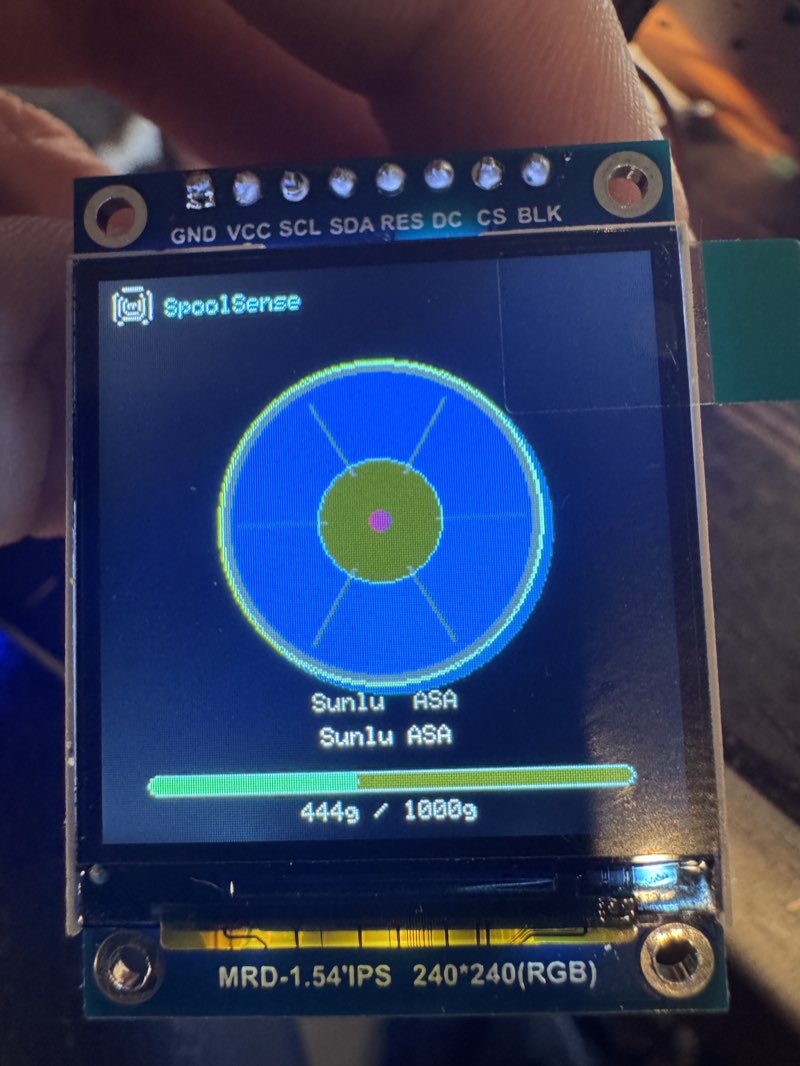
Mutually exclusive with LCD
The TFT and LCD share GPIO 22/23 on WROOM. You can enable one or the other, not both.
What You Need
- 1.54" ST7789 240x240 SPI TFT module (8-pin: GND, VCC, SCL, SDA, RES, DC, CS, BLK)
- 7 jumper wires (SCL, SDA, DC, CS, RES, VCC, GND) — 8 if wiring BLK for backlight control
Wiring (ESP32-WROOM)
| TFT Pin | ESP32 Pin | Notes |
|---|---|---|
| GND | GND | |
| VCC | 3.3V | |
| SCL | GPIO 22 | SPI clock (shared with LCD SCL when LCD enabled) |
| SDA | GPIO 23 | SPI data / MOSI (shared with LCD SDA when LCD enabled) |
| RES | EN | Wired to ESP32 reset pin for reliable cold boot |
| DC | GPIO 4 | Data/command select (freed from LED when using TFT) |
| CS | GPIO 2 | Chip select |
| BLK | 3.3V | Backlight always on (or leave unconnected) |
RES pin
Wire the TFT's RES pin to the ESP32's EN pin. This ensures the display resets on every power cycle. Without this, the display may stay blank on cold boot (software reboot works fine either way).
LED pin
GPIO 4 is normally used for the status LED. When using the TFT, the LED is not needed since the display shows filament color directly. Disconnect the LED and use GPIO 4 for the TFT DC pin.
Wiring (ESP32-S3-Zero + PN532)
PN532 only
On the S3-Zero, the TFT is only compatible with the PN532 NFC reader. The PN5180 uses too many of the limited header pins (GPIO 4-12), leaving insufficient free GPIOs for the TFT. The S3-Zero has GPIO 1-13 on side headers — GPIO 14+ are back pads that require soldering.
| TFT Pin | ESP32-S3 Pin | Notes |
|---|---|---|
| GND | GND | |
| VCC | 3.3V | |
| SCL | GPIO 12 | SPI clock |
| SDA | GPIO 13 | SPI data / MOSI |
| RES | GPIO 9 | Hardware reset (freed from PN5180 BUSY) |
| DC | GPIO 3 | Data/command select |
| CS | GPIO 10 | Chip select (freed from PN5180 GPIO) |
| BLK | 3.3V | Backlight always on |
No external LED needed
The S3-Zero has an onboard WS2812 LED on GPIO 21 that still works alongside the TFT. The TFT also shows filament color directly.
What It Shows
- Boot: SpoolSense logo + firmware version
- Ready: Grey spool graphic with "Tap a spool to scan"
- Spool scanned: Color spool graphic with filament color fill, weight bar, brand and material name, tag format icon
- Low spool: Breathing/pulsing brightness when remaining weight is below 100g
- Keypad entry: Large tool number with confirm/cancel prompt
- Write result: Green checkmark or red X
- WiFi/status: Connection status during boot
- AP mode: Setup instructions with IP address
Enable in Firmware
The TFT is enabled via the web config page (/config > Hardware > TFT Display toggle). No recompile needed.
Make sure the LCD toggle is off when enabling TFT on WROOM.
Compatible Displays
| Display | Size | Resolution | Driver | Status |
|---|---|---|---|---|
| 1.54" ST7789 Square | 1.54" | 240x240 | ST7789 | Tested |
| 1.3" ST7789 Square | 1.3" | 240x240 | ST7789 | Should work (same driver) |
| GC9A01 Round | 1.28" | 240x240 | GC9A01 | Untested — community help wanted |
The firmware uses LovyanGFX which supports many SPI display drivers. Any 240x240 SPI TFT with a supported driver should work with a config change. If you try a display not listed here, let us know in Discord.
GC9A01 Round Display
The GC9A01 is a round 240x240 TFT that would look great as a standalone scanner — the spool graphic centered in a circular display. Same resolution and SPI interface as the ST7789. If you have one and want to test, join the Discord.
SPI Bus Note
The TFT uses VSPI (the ESP32's default SPI bus). The PN5180 NFC reader is automatically moved to HSPI when the TFT is compiled in, so both devices run on separate SPI peripherals with no bus contention.